Decode it: METARs, NOTAMs & sectional charts
The three skills a text question can only half-teach. Read a weather report, a NOTAM, and a VFR sectional the way the test expects — then drill them. 14 CFR 107.49 (preflight)
1 · Decode a METAR
A METAR is an observed weather report. Read it left to right. Example:
KORD 121651Z 18012G20KT 10SM FEW050 27/14 A2998 RMK AO2
| group | means | how to read it |
|---|---|---|
| KORD | Station | Reporting station — ICAO identifier (here, Chicago O’Hare). |
| 121651Z | Date/time | Day 12 of the month, 1651 UTC ("Z" = Zulu / UTC). Always UTC, not local. |
| 18012G20KT | Wind | From 180° true at 12 knots, gusting 20 kt. "VRB" = variable; "00000KT" = calm. Gusts matter for control margin. |
| 10SM | Visibility | Statute miles. Part 107 requires at least 3 SM from the control station. Fractions like "1/2SM" appear in low vis. |
| FEW050 | Sky / clouds | Few clouds at 5,000 ft AGL. SKC/CLR = clear · FEW (1–2/8) · SCT (3–4/8) · BKN (5–7/8) · OVC (8/8). A "ceiling" is the lowest BKN or OVC layer. |
| 27/14 | Temp / dew point | Temperature 27°C / dew point 14°C. A small, closing spread → fog/low cloud risk. Drives density altitude too. |
| A2998 | Altimeter | Altimeter setting 29.98 inHg. |
| RMK … | Remarks | Automated/manual notes (e.g., AO2, sea-level pressure). "AUTO" earlier in the report = automated station. |
For Part 107: you need at least 3 SM visibility and must stay 500 ft below / 2,000 ft horizontally from clouds. Watch wind & gusts for control, and a closing temp/dew-point spread for fog. 14 CFR 107.51 · AIM 7-1
2 · Read a NOTAM
A NOTAM (Notice to Airmen) flags a temporary change you must know before flying — closed runways, new obstacles, airspace restrictions, and TFRs (issued as FDC NOTAMs).
Check before every flight: the FAA NOTAM Search (notams.aim.faa.gov), your B4UFLY-style app, or a Flight Service briefing (1-800-WX-BRIEF). A TFR — common over wildfires, stadiums, and VIP movements — can ground you even in otherwise-legal airspace. 14 CFR 107.49 · 107.45 (TFRs)
3 · Read a VFR sectional chart
The exam shows cropped chart excerpts and asks what airspace you’re in and how high it goes. The color and line style tell you the class; the numbers give ceilings/floors in hundreds of feet MSL.
| airspace / symbol | how it’s drawn | what it tells you |
|---|---|---|
| Class B | Solid blue lines | Concentric rings ("upside-down wedding cake"). Floors/ceilings printed in blue (e.g., 100/SFC = 10,000 ceiling / surface floor, in hundreds of ft MSL). |
| Class C | Solid magenta lines | Ceiling/floor in magenta, e.g., 41/13 = 4,100 MSL ceiling over 1,300 MSL floor. |
| Class D | Dashed blue lines | Ceiling shown in a dashed blue box, e.g., [25] = 2,500 ft MSL (top of Class D). |
| Class E surface area (E2) | Dashed magenta circle | Encircles an airport where controlled airspace reaches the ground. This is the only Class E that triggers a 107.41 authorization. |
| Class E extension (E4) | Dashed magenta keyhole/rectangle | A protrusion off a Class C or D surface area, protecting an instrument approach. It reaches the surface, but it is an extension TO a surface area rather than the surface area designated FOR an airport — no 107.41 authorization required. |
| Class E from 700 AGL | Faded magenta vignette | Shaded magenta band that fades outward — Class E floor begins at 700 ft AGL inside it. |
| Class E from 1,200 AGL | Faded blue vignette / boundary | Outside the magenta — controlled Class E begins at 1,200 ft AGL. |
| Class G | No outline (uncontrolled) | Everything below the Class E floor. No ATC authorization needed, but other rules still apply. |
| MOA / Alert / Warning | Magenta hatched border | Special-use airspace; check times of use. |
| Restricted / Prohibited | Blue hatched border (R-### / P-###) | Do not enter Prohibited; Restricted only when "cold"/authorized. |
| MEF (Max Elevation Figure) | Large bold number in a quadrangle | e.g., 12⁵ = 12,500 ft — highest terrain/obstacle in that quadrangle. |
| Latitude / longitude | Thin black tick lines | Latitude lines run east–west and measure north/south position. |
Rule of thumb: blue = Class B & D, magenta = Class C & E; solid = B/C, dashed = D and surface-E, faded vignette = where Class E begins aloft. Controlled airspace (B/C/D/surface-E) needs prior ATC authorization — get it instantly via LAANC. 14 CFR 107.41 · Sectional Chart legend
The FAA’s own legend and charts
These are the actual pages of the FAA testing supplement, FAA-CT-8080-2H. Tap any image to open the whole page and zoom. Every figure and legend is in the figure library.
The legend: airspace lines, the Class D ceiling box, Class E floors, and special use airspace borders.
FAA-CT-8080-2H · Legend 1 · page 1-1 · part of the page shown; tap the image for the whole page
The legend: how to read an airport data block.
FAA-CT-8080-2H · Legend 1 · page 1-1 · part of the page shown; tap the image for the whole page
Class C: solid magenta rings, each sector labelled ceiling over floor in hundreds of feet MSL.
FAA-CT-8080-2H · Figure 23 · page 2-22 · part of the page shown; tap the image for the whole page
Class D: a dashed blue ring with its ceiling in a dashed blue box.
FAA-CT-8080-2H · Figure 21 · page 2-20 · part of the page shown; tap the image for the whole page
Class E beginning at the surface: a dashed magenta line around the airport.
FAA-CT-8080-2H · Figure 26 · page 2-25 · part of the page shown; tap the image for the whole page
Class E beginning at 700 feet AGL: a shaded magenta band.
FAA-CT-8080-2H · Figure 21 · page 2-20 · part of the page shown; tap the image for the whole page
Special use airspace: restricted areas bordered in blue hatching, a MOA in magenta.
FAA-CT-8080-2H · Figure 26 · page 2-25 · part of the page shown; tap the image for the whole page
Obstructions: top elevation above mean sea level, with height above ground in parentheses.
FAA-CT-8080-2H · Legend 1 · page 1-1 · part of the page shown; tap the image for the whole page
Two study sheets of our own
The supplement has no side-view of the airspace classes and no answering workflow, so these two sheets are ours. Tap either to open it full-size.
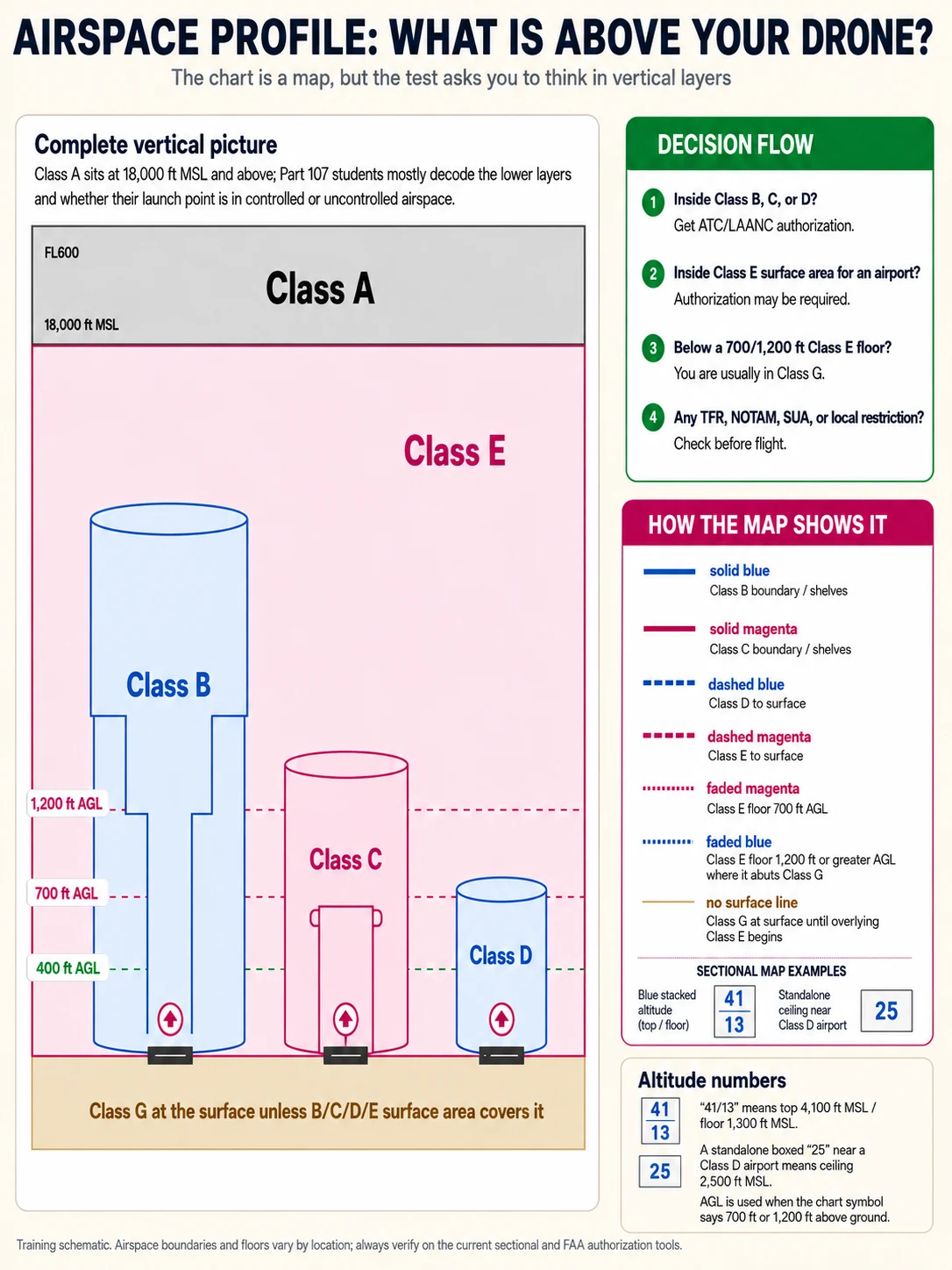
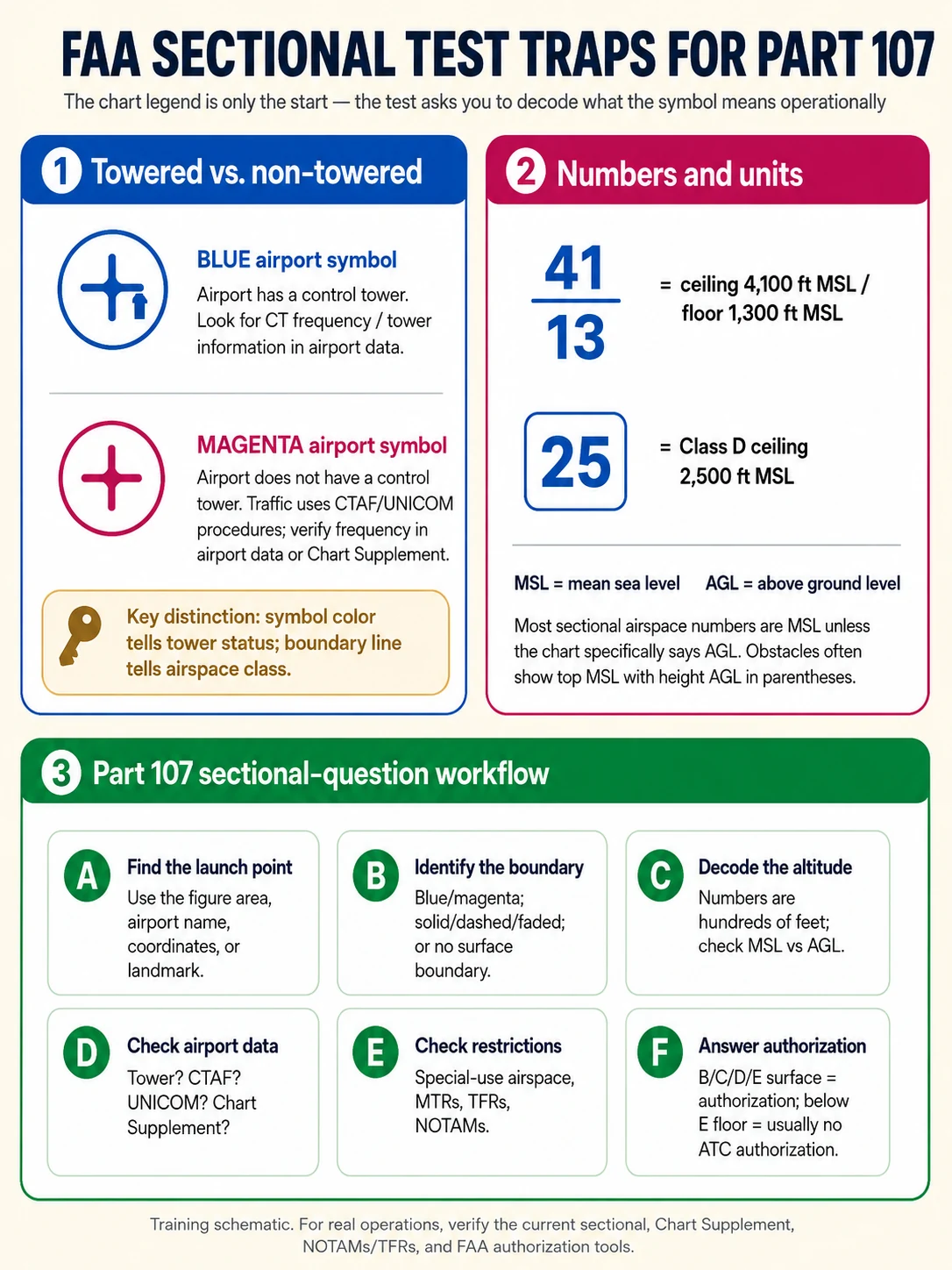
Independent study aid — always verify operations against the current sectional, Chart Supplement, and NOTAMs/TFRs.
4 · Read airport markings & the traffic pattern
You won’t land at an airport, but the exam tests airport markings — and knowing them helps you predict where manned aircraft will be so you can stay clear.
Airport markings, including the runway holding position markings.
FAA-CT-8080-2H · Figure 64 · page 2-61 · tap the image to zoom
An airport diagram: runway numbers painted at each end.
FAA-CT-8080-2H · Figure 49 · page 2-46 · tap the image to zoom
U.S. airport signs.
FAA-CT-8080-2H · Figure 65 · page 2-62 · tap the image to zoom
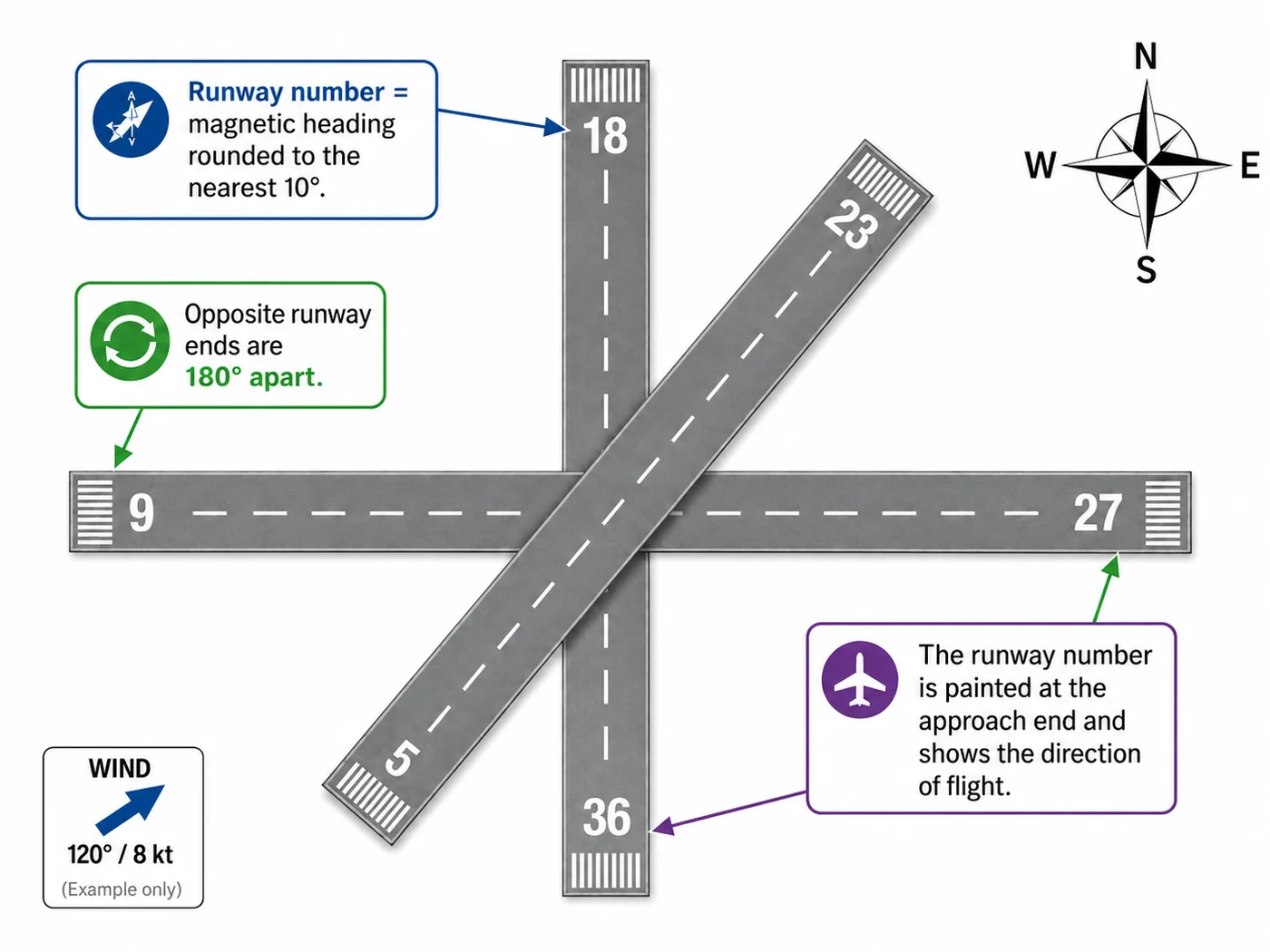
- Runway numbers = magnetic heading ÷ 10. Runway “09” points ~090°; the other end is “27” (270°) — always 18 apart.
- Hold-short marking = two solid + two dashed yellow lines. Hold short of the solid side; don’t cross onto the runway until cleared (towered) or confirmed safe (non-towered).
- Displaced threshold (arrows → a solid line) = pavement usable for taxi/takeoff but not landing.
- Traffic pattern = left turns by default; pilots self-announce on the CTAF at non-towered fields.
- Wind is reported as the direction it comes FROM. “Wind 120 at 8” means the air arrives from the south-east and moves toward the north-west. Take off and land into the wind, so you pick the runway whose number is closest to the reported direction — with wind from 120°, that is runway 9 (090°), not 23.
FAA-H-8083-25C Ch.14 · AIM 2-3 / 4-1 / 4-3
5 · The airspace cross-section
A sectional is the top-down view; this is the side view of the same airspace. Most Part 107 flying starts in Class G (uncontrolled), below the Class E floor.
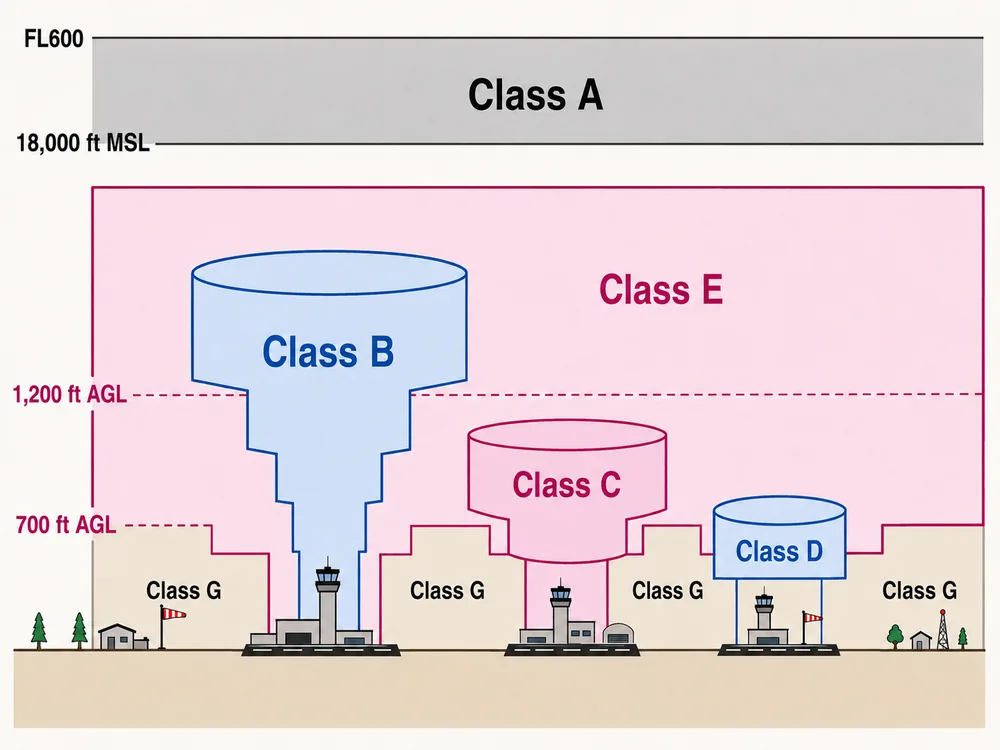
Class A: 18,000′ MSL→FL600 (drones never go there). Class B/C/D surround busy airports and need ATC authorization. Class E is controlled airspace that begins at 700′ or 1,200′ AGL (or the surface near some airports); everything below it is Class G. AIM 3-2 / 3-3
6 · The four conversions
Four questions on the exam are not recall at all — they are a short procedure you either run or guess at. Each one turns a charted number into a number you can act on, and each has a single step where most of the errors happen.
1 · Charted ceiling (MSL) → height above the ground
AIM 3-2-5 · chart legend
2 · Structure inspection envelope
14 CFR 107.51(b)
3 · Cloud base, then the legal ceiling
FAA-H-8083-25C Ch.12 · 14 CFR 107.51(d)
4 · Runway number → heading → reciprocal → pattern side
AIM 4-3-3
Every figure above is worked from the cited FAA source, not from a rule of thumb. The convergence rate and its worked example are the FAA’s own, in Fahrenheit — a Celsius version circulates widely but is not in the handbook.
Checkride107 is independent prep — not affiliated with or endorsed by the FAA. Always verify against the current FAR/AIM and chart legend.